Marketing Data Project
July 2025
Marketing Data Project
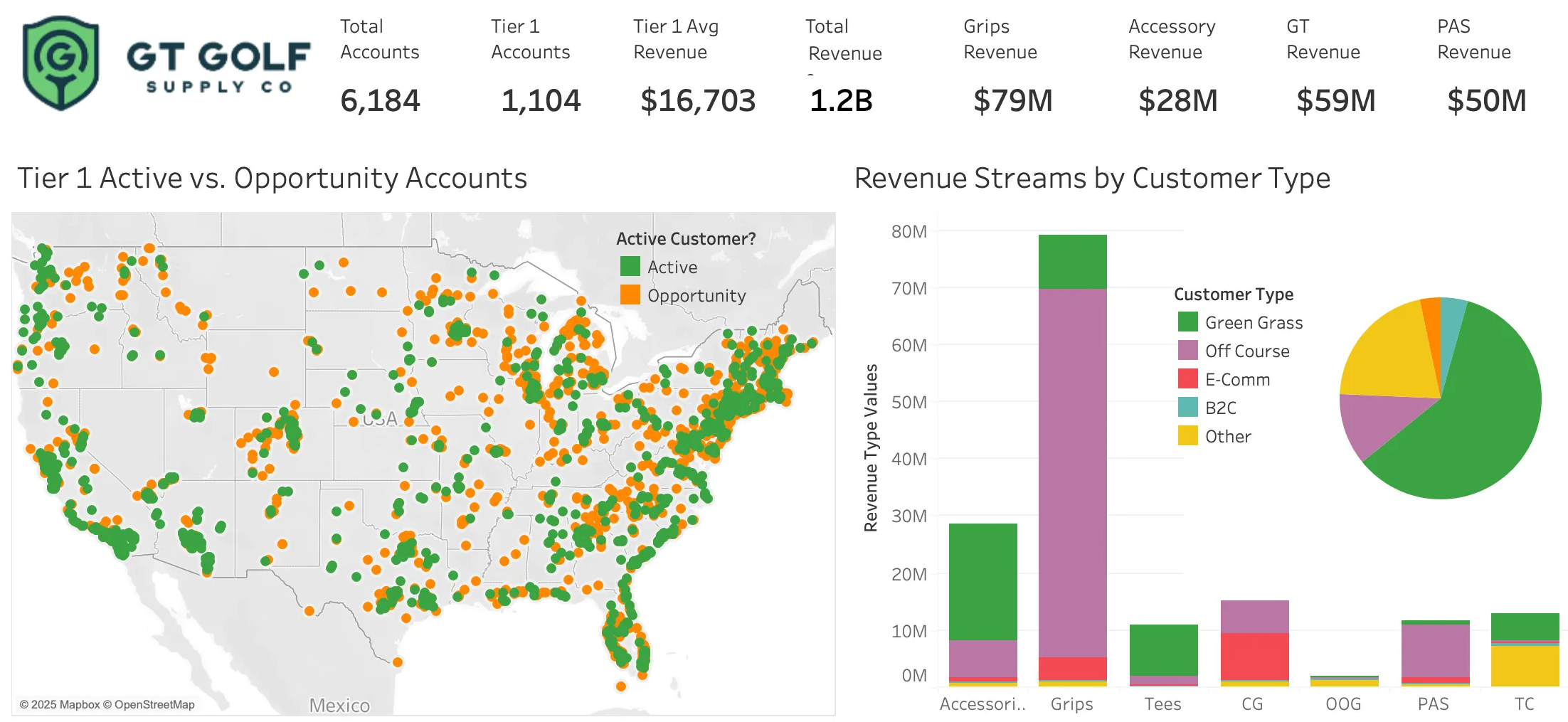
Problem: New Aquisition Data Doesn't Allign
A PE-backed golf company that had recently aquired several smaller companies with adjacent product lines. Their data that had been concatonated from several datasets and was inconsistant, sparse, had duplicate clients; it was unusable for analysis necessary to run a business. They needed clean consistent crm-ready data that could be matched to national industry-wide data for analysis and customer prospecting.
Solution: Data Hygene > CRM enablement > Business Intelligence
I cleaned, standardized, de-duplicated, classified blank customer types for . This made their data usable for marketing strategy. I merged data to a purchased national industry database, found a relable revenue predictor, new customer categoiries, and monetizable patterns.
I presented my findings and visualizations in regular creative marketing strategy meetings with the VP of Marketing. My data visualizations and maps were used as key visuals in quarterly board meetings for executive level decisions, as well as long term regional marketing strategy.
Process
Data Wrangling
Customer data was extremely messy and had many non-standardized and blank fields critical for analysis. Data was entered by golf reps from different companies and had varied jargon and abbreviations. Newly aquired companies had their own reps and often sold products to the same customers; this was hidden in the data by duplicate customer entries. I standardized company names, geographic fields, and across multi-origin data. I deduplicated companies using fuzzy matching in python.
Because the Golf industry has a lot of similar company names, I wrote my matching algorith to require an exact State match and fuzzy matched the Company Name and Address. I set my Fuzzy match threshold fairly low (75%) and manually reviewed matches between 75-90%.
Python Code for Fuzzy Matching
import pandas as pd
from rapidfuzz import fuzz
from itertools import combinations

MATCH_COLUMNS = ['State']
FUZZY_COLUMNS = ['Company Name', 'Address']
FUZZY_THRESHOLD = 75

def is_fuzzy_match(row1, row2, threshold=FUZZY_THRESHOLD):
    for col in FUZZY_COLUMNS:
        val1, val2 = str(row1[col]), str(row2[col])
        if fuzz.token_sort_ratio(val1, val2) < threshold:
            return False
    return all(row1[col] == row2[col] for col in MATCH_COLUMNS)

def find_duplicates(df):
    duplicates = []
    checked_pairs = set()

    for i, j in combinations(df.index, 2):
        row1, row2 = df.loc[i], df.loc[j]
        if is_fuzzy_match(row1, row2):
            duplicates.append(row1.to_dict())
            duplicates.append(row2.to_dict())
        checked_pairs.add((i, j))

    return pd.DataFrame(duplicates)

df = pd.DataFrame(gt)
duplicates_df = find_duplicates(df)

print(f"Found {len(duplicates_df)} duplicates")
Found 308 duplicates.
Matching to a National Database
The client purchased national database of golf courses that had a wealth of demographic, facility and financial information. I merged this data to existing cleaned customer data using fuzzy matching on the company names and exact match for city and state. With this information, I was able to enrich existing customer data to find revenue trends for existing customer and find opportunity accounts.
Value Created
Identified Two New Unique Customer Types
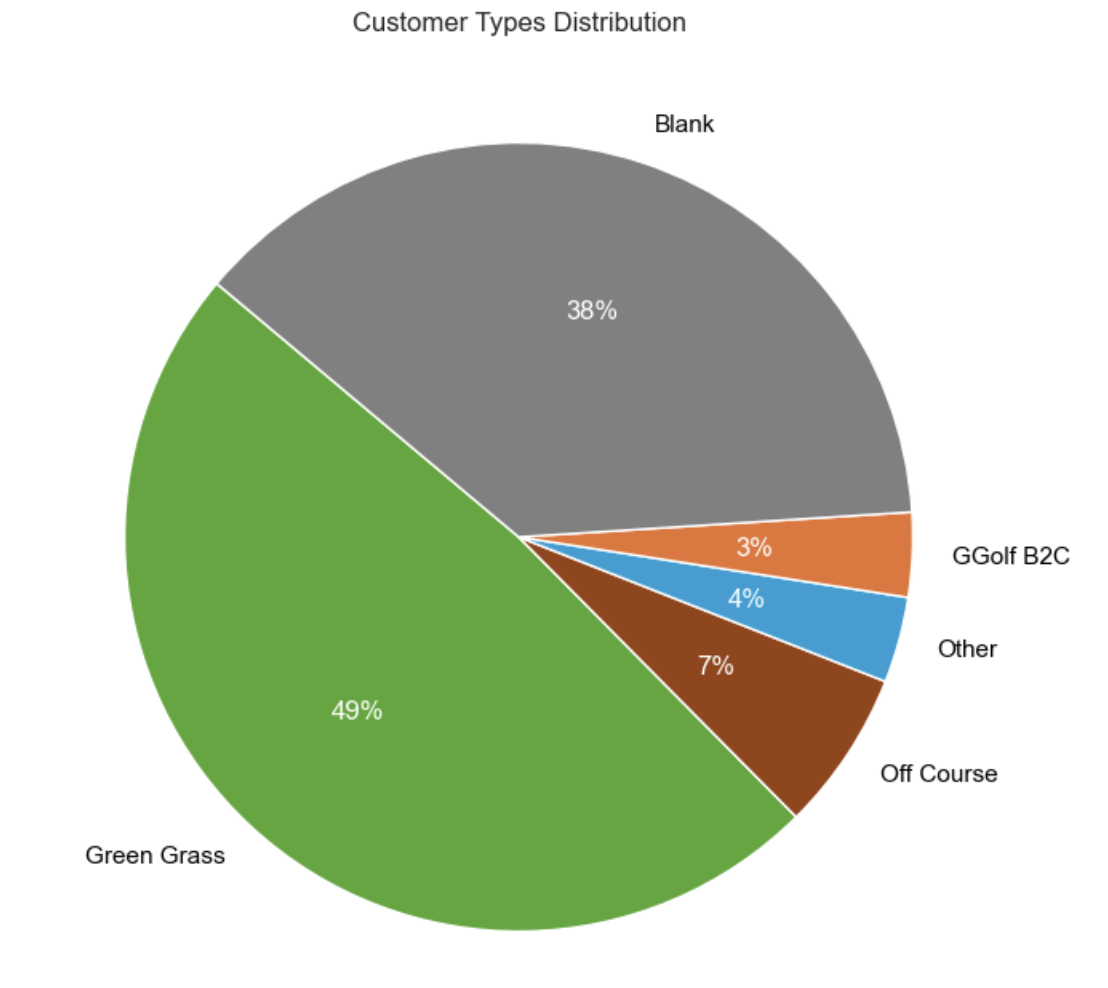
When I got the data, the customer type field was 38% blank. I classified all customers and identified two new customer categories, University Teams and Disc Golf Courses.
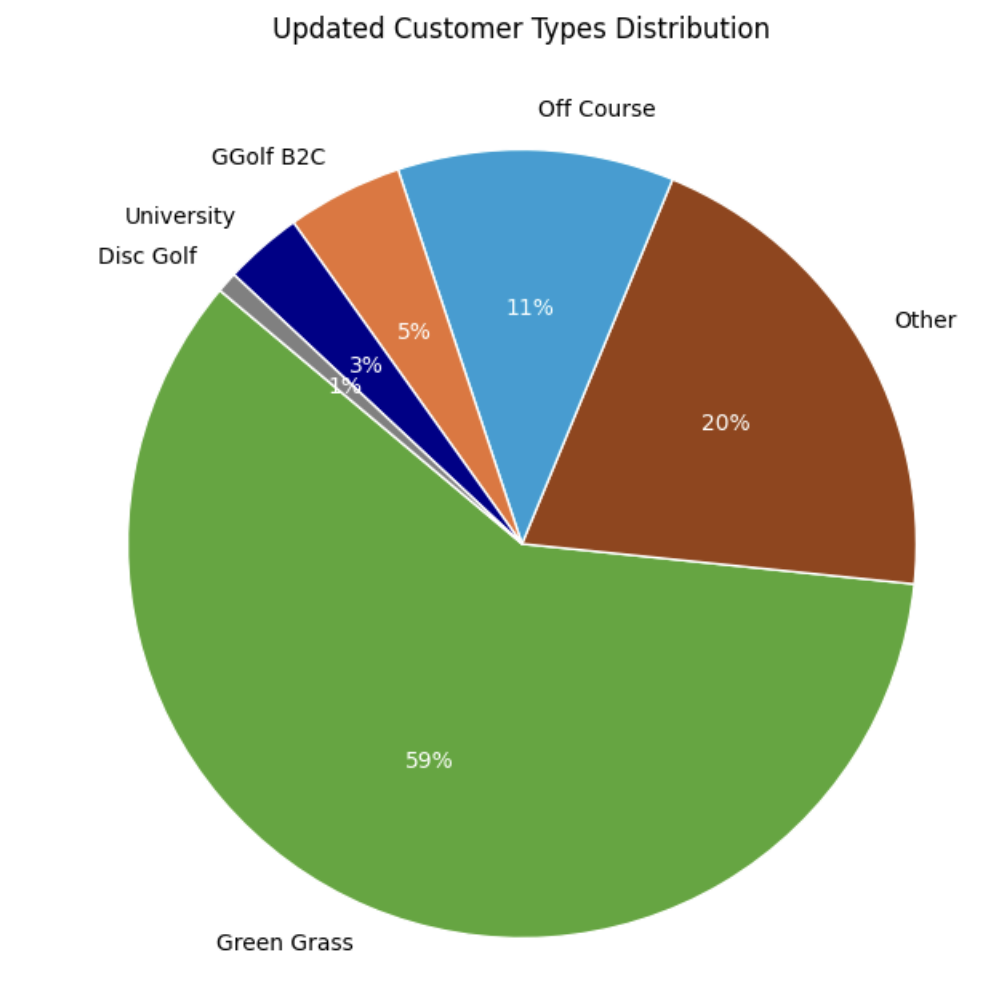
Original Data had 38% blank customer types, from aquired company data. Primary task was to find all the green grass accounts among the blanks. I found additionall categories by with text analysis of the company name field.
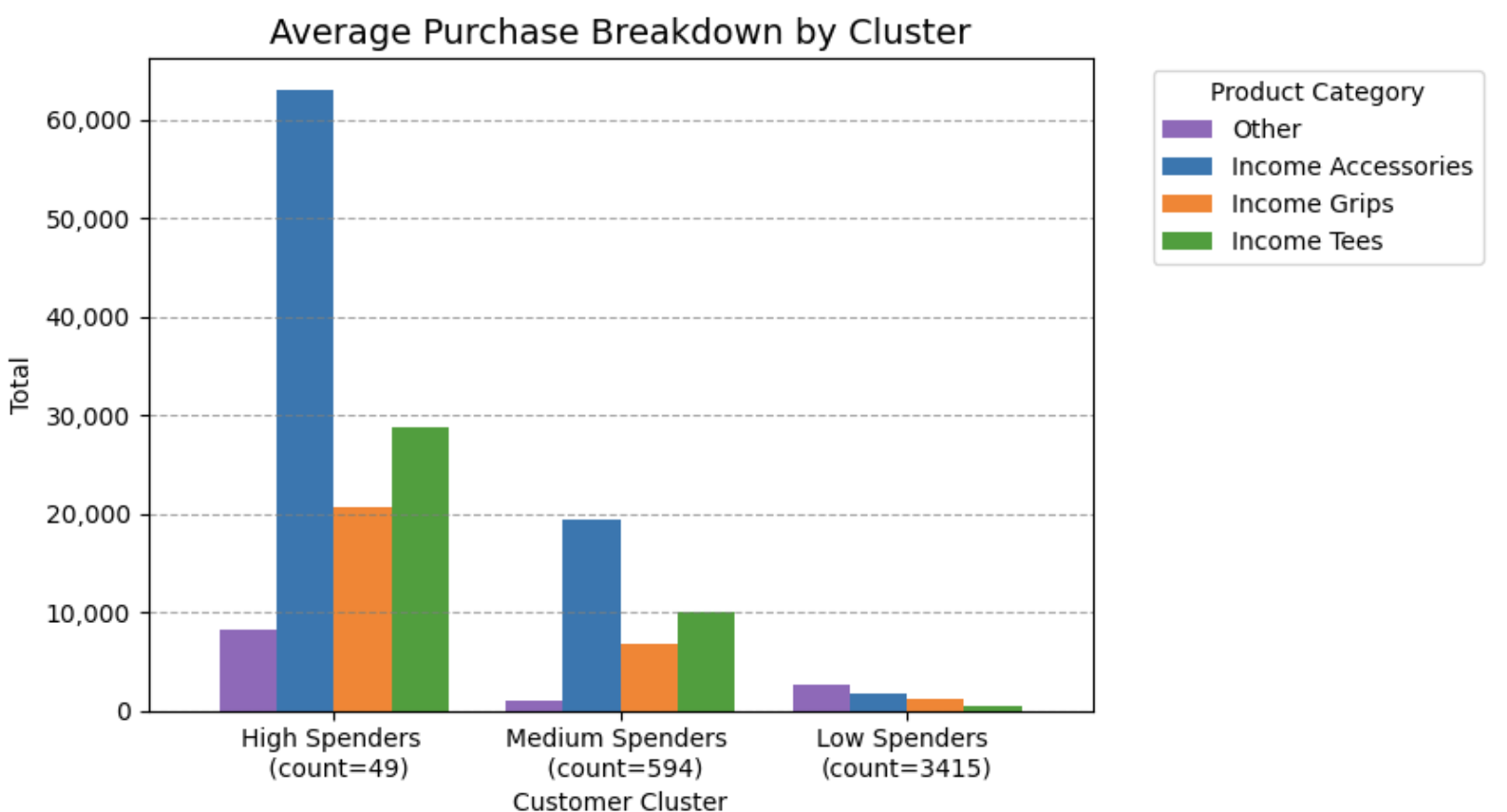
Customer Segmentation by Spending
I used k-means on several revenue categories to cluster customers by spending habits. High spenders generate outsized revenue in accessories, which scale faster than other categories, making accessories the strongest lever for segment-based revenue growth.
Cross-Selling Opportunity
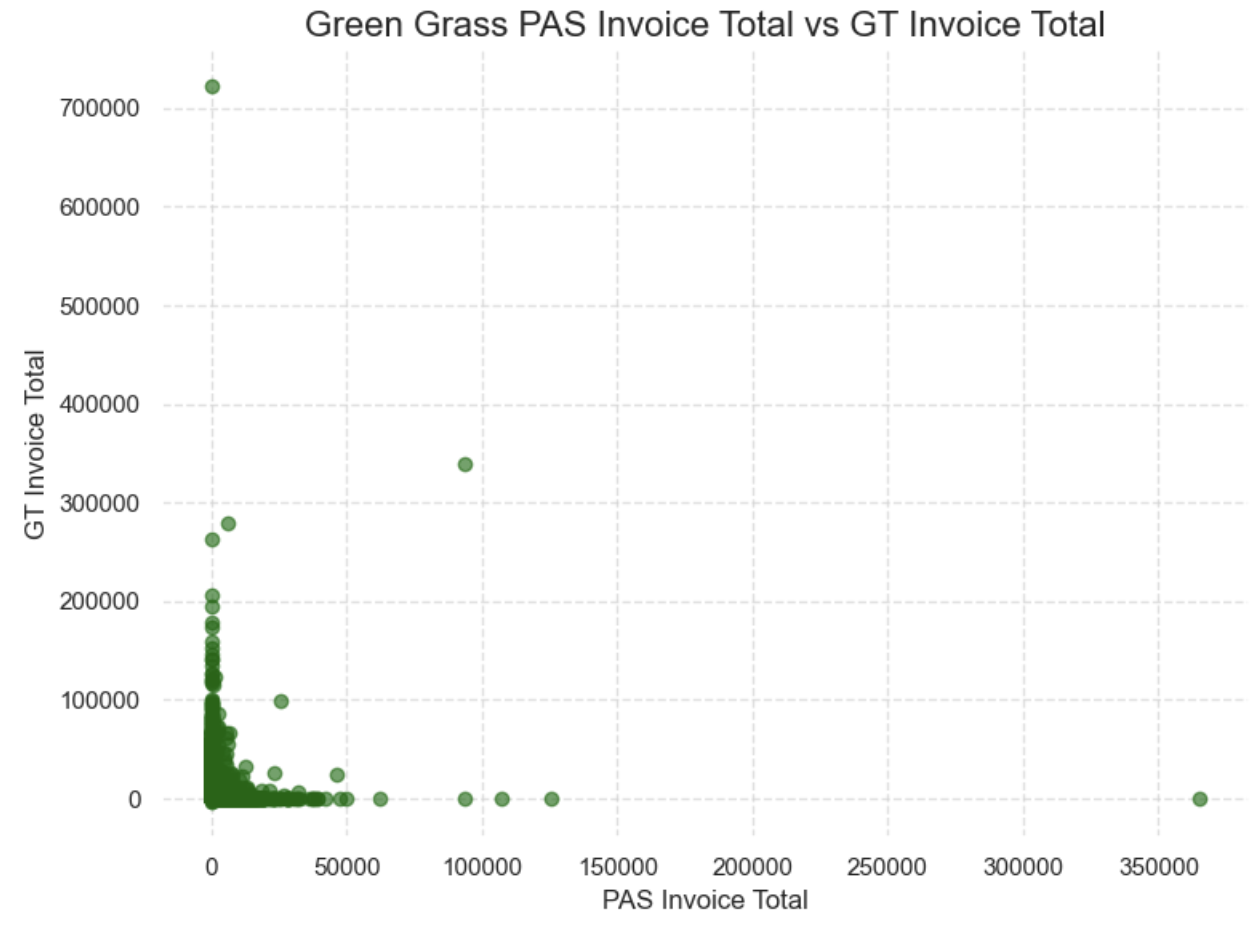
I found that most customers were buying only one of the 2 main product lines. This was a huge cross-selling opportunity. While a few of their reps were selling both product lines to customers, most were not aware of the other product line. The aquisitions came with company reps and these new reps were not acting on the merge. Visualizing this problem helped the marketing team to realize that before they expanded their market, they needed to focus on getting their reps up to date on new product lines.
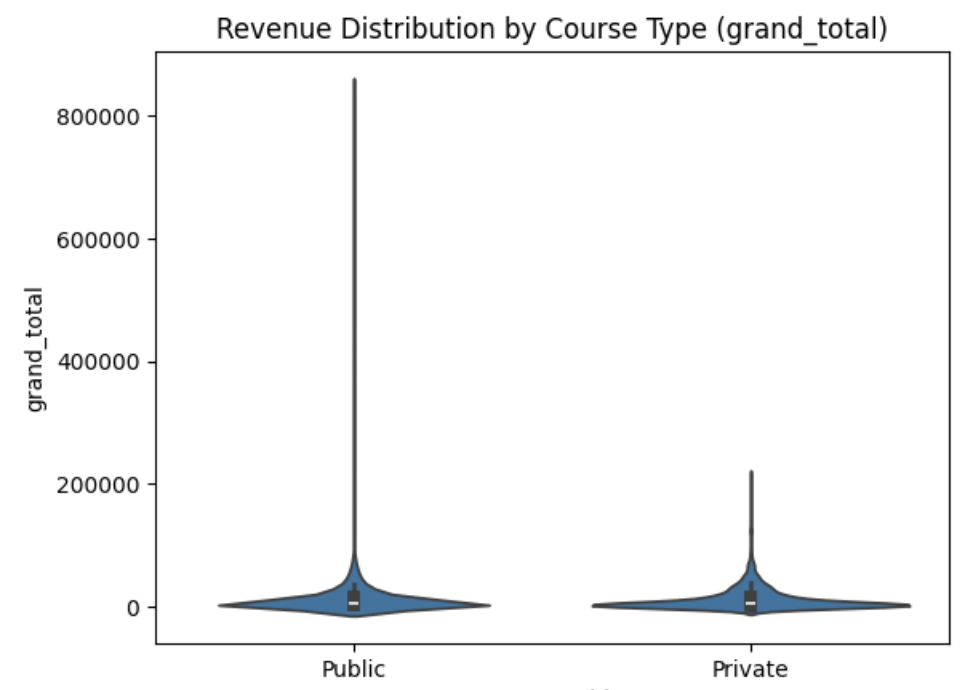
Resolving Public/Private Revenue Discrepancy
The client marketing team wanted to validate an assumption with leadership, who believed that public golf courses created more revenue. I found that, while there were a few exceptionally high revenue public courses, in general, Public vs. Private status did not predict revenue.
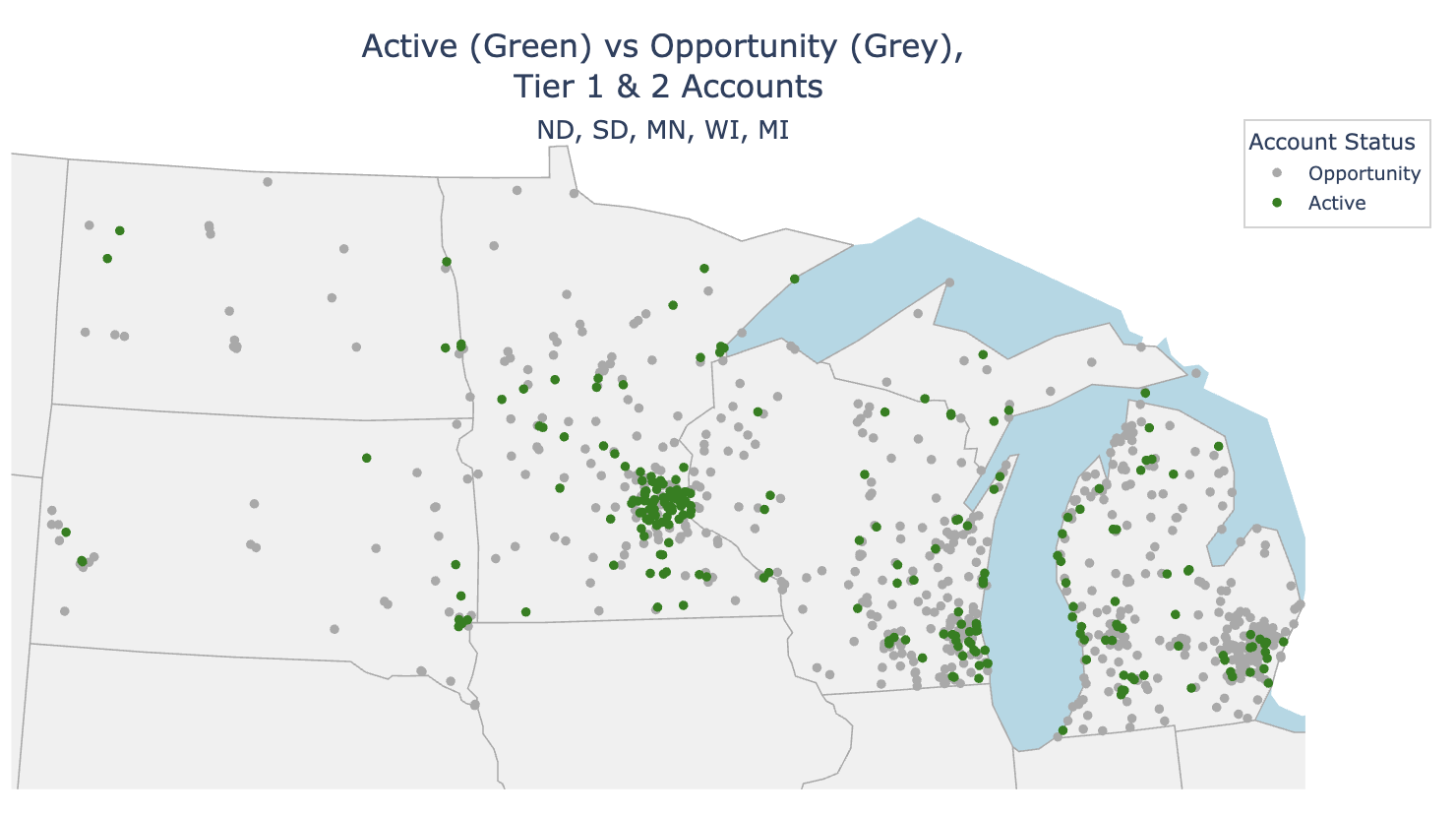
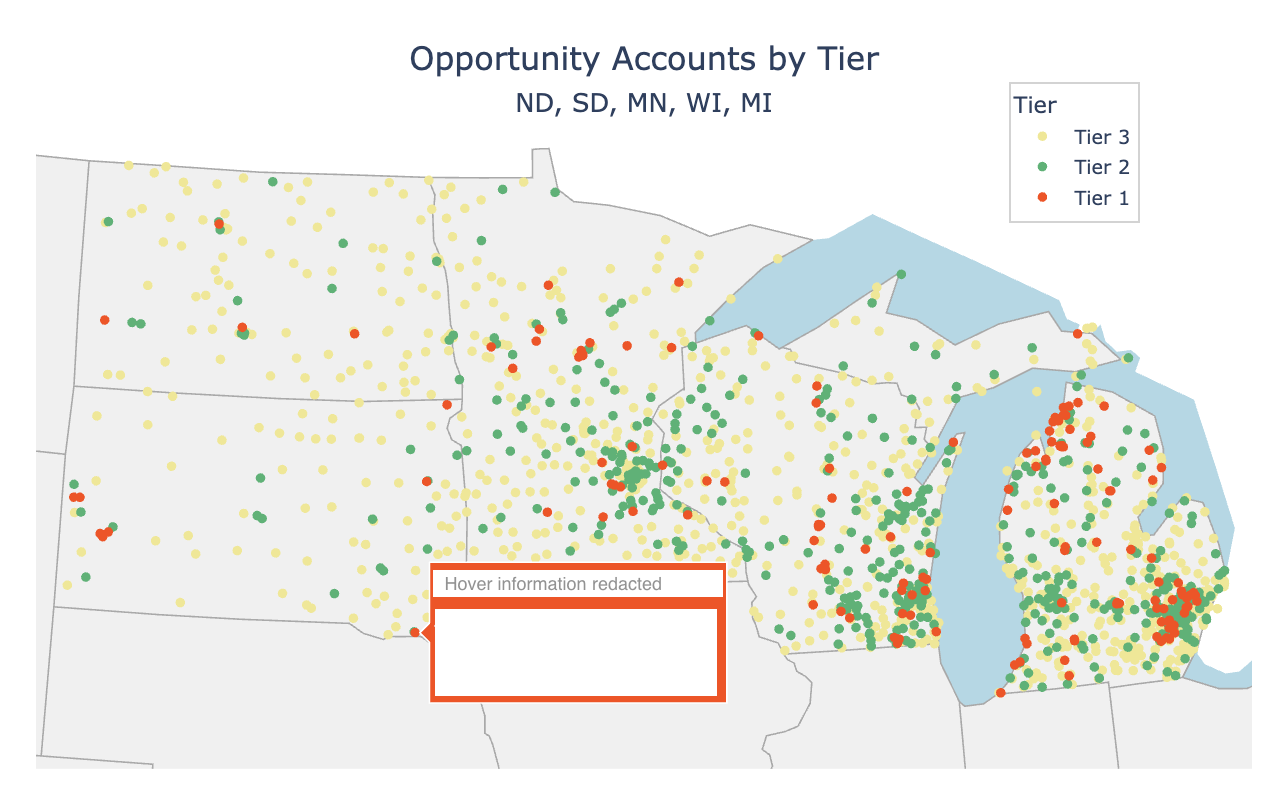
Regional Tier & Opportunity Maps
The client decided on a staged marketing plan by region and after one of our creative strategy meetings, I translated their paper map to python code and provided maps of Tiered Customers and another for Active/Opportunity Accounts. The marketing team was able to use these visualizations to plan their regional rep strategy.
Python Code for Regional Analysis Maps
#imports
import pandas as pd
import numpy as np
import seaborn as sns
import matplotlib.pyplot as plt
from matplotlib.ticker import ScalarFormatter
from matplotlib.ticker import FuncFormatter
from matplotlib.backends.backend_pdf import PdfPages
import re
import pgeocode
import plotly.express as px
import csv
from shapely.geometry import Point
import geopandas as gpd
from uszipcode import SearchEngine
from openpyxl import load_workbook

# Read in data
gt_full = pd.ExcelFile('./GT_Golf_full_data_09-01-2025.xlsx')
gt = pd.read_excel(gt_full, 'GT Golf')
national = pd.read_excel(gt_full, 'National List')
reps = pd.read_excel(gt_full, 'GT Rep List')

# States by region
pacific_northwest = ['WA', 'OR']
california = ['CA']
mountain_west = ['MT', 'ID', 'UT', 'WY', 'CO']
south_west = ['NV', 'AZ', 'NM']
great_lakes = ['ND', 'SD', 'MN', 'WI', 'MI']
mid_west = ['NE', 'KA', 'IA', 'MS', 'IL']
mid_east = ['IN', 'OH', 'KY', 'TN']
texas_plus = ['TX', 'OK', 'AR', 'LA', 'MS']
south_east = ['AL', 'GA', 'FL']
mid_atlantic = ['SC', 'NC', 'VA', 'DC', 'MD', 'DE']
penn_plus = ['PA', 'WV']
ny_plus = ['NY', 'NJ']
northeast = ['VT', 'NH', 'MA', 'RI', 'CT', 'ME'],
alaska = ['AK']
hawaii = ['HI']

# States by region as a dictionary
regions = {
    'pacific_northwest': ['WA', 'OR'],
    'california': ['CA'],
    'mountain_west': ['MT', 'ID', 'UT', 'WY', 'CO'],
    'south_west': ['NV', 'AZ', 'NM'],
    'great_lakes': ['ND', 'SD', 'MN', 'WI', 'MI'],
    'mid_west': ['NE', 'KS', 'IA', 'MO', 'IL'],
    'mid_east': ['IN', 'OH', 'KY', 'TN'],
    'texas_plus': ['TX', 'OK', 'AR', 'LA', 'MS'],
    'south_east': ['AL', 'GA', 'FL'],
    'mid_atlantic': ['SC', 'NC', 'VA', 'DC', 'MD', 'DE'],
    'penn_plus': ['PA', 'WV'],
    'ny_plus': ['NY', 'NJ'],
    'northeast': ['VT', 'NH', 'MA', 'RI', 'CT', 'ME'],
    'alaska': ['AK'],
    'hawaii': ['HI']
}
# Regions as a list
regions = ['pacific_northwest', 'california', 'mountain_west', 'south_west', 'great_lakes', 'mid_west',
'mid_east', 'texas_plus', 'south_east', 'mid_atlantic', 'penn_plus', 'ny_plus', 'northeast']

# Tiering Level Maps
def make_region_map(states, region_name):
    # Filter and select columns
    df_map = national.rename(columns={
        "LocStateProvince": "State",
        "Company Name": "Company Name",
        "Active Customer?": "Active Customer?",
        "TIERING LEVEL": "Tier",
        "LAT": "LAT",
        "LON": "LON"
    }).copy()

    df_map = df_map[df_map["State"].isin(states)][
        ["Company Name", "State", "Active Customer?", "Tier", "LAT", "LON"]
    ].dropna(subset=["LAT", "LON"])

    # Normalize Active/Opportunity values
    df_map["Active Customer?"] = df_map["Active Customer?"].where(
        df_map["Active Customer?"].isin(["Active", "Opportunity"]),
        other="Opportunity"
    )

    # Filter to top 2 tiers
    top_tier = df_map[df_map['Tier'].isin([1, 2])]

    if top_tier.empty:
        print(f"Skipping {region_name}: no Tier 1/2 rows")
        return

    subtitle = ", ".join(states) if isinstance(states, (list, tuple)) else str(states)
    title_text = (
    f"Active (Green) vs Opportunity (Grey),<br> Tier 1 & 2 Accounts"
    f"<br><span style='font-size:16px'>{subtitle}</span>"
    )
    fig = px.scatter_geo(
        top_tier,
        lat='LAT',
        lon='LON',
        color='Active Customer?',
        scope='usa',
        projection='albers usa',
        hover_name='Company Name',
        title=f'Active (Green) vs Opportunity (Grey)<br> Tier 1 & 2 Accounts',
        category_orders={"Active Customer?": ["Opportunity", "Active"]},
        color_discrete_map={"Active": "green", "Opportunity": "darkgrey"}
    )

    fig.update_layout(
        title={
            "text": title_text,
            "x": 0.5,
            "y": .97,
            "xanchor": "center",
            "yanchor": "top",
            "font": dict(size=20)
        },
        title_font=dict(size=20),
        height=500,
        width=1000,
        geo=dict(
            showland=True,
            landcolor='rgb(240, 240, 240)',
            lakecolor='lightblue',
            subunitcolor='darkgrey',
            subunitwidth=1,
        ),
        legend=dict(
            x=0.89,
            y=0.989,
            bgcolor='rgba(255,255,255,0.7)',
            bordercolor='lightgrey',
            borderwidth=1
        ),
        legend_title='Account Status',
        margin=dict(l=20, r=20, t=50, b=20)
    )

    fig.show()

# Loop through all regions
for region_name, states in region_groups.items():
    make_region_map(states, region_name)

# Opportunity Account Maps
def make_opportunity_map(states, region_name):
    # Filter and select needed columns
    df_map = national.rename(columns={
        "LocStateProvince": "State",
        "Company Name": "Company Name",
        "Active Customer?": "Active Customer?",
        "TIERING LEVEL": "Tier",
        "LAT": "LAT",
        "LON": "LON"
    }).copy()

    df_map = df_map[df_map["State"].isin(states)][
        ["Company Name", "State", "Active Customer?", "Tier", "LAT", "LON"]
    ].dropna(subset=["LAT", "LON"])

    # Keep only Opportunity accounts
    df_map = df_map[df_map["Active Customer?"].eq("Opportunity")]

    # Ensure Tier is numeric then filter to 1/2/3
    df_map["Tier"] = pd.to_numeric(df_map["Tier"], errors="coerce")
    df_map = df_map[df_map["Tier"].isin([1, 2, 3])]

    if df_map.empty:
        print(f"Skipping {region_name}: no Opportunity Tier 1–3 accounts")
        return

    # Tier labels
    tier_labels = {1: "Tier 1", 2: "Tier 2", 3: "Tier 3"}
    df_map["TierLabel"] = df_map["Tier"].map(tier_labels)

    # Discrete colors for each tier
    tier_colors = {"Tier 1": "orangered", "Tier 2": "mediumseagreen", "Tier 3": "khaki"}

    # Subtitle (state codes)
    subtitle = ", ".join(states) if isinstance(states, (list, tuple)) else str(states)

    fig = px.scatter_geo(
        df_map,
        lat="LAT",
        lon="LON",
        color="TierLabel",
        scope="usa",
        projection="albers usa",
        hover_name="Company Name",
        title="Opportunity Accounts by Tier",
        category_orders={"TierLabel": ["Tier 3", "Tier 2", "Tier 1"]},
        color_discrete_map=tier_colors
    )

    fig.update_layout(
        title={
            "text": f"Opportunity Accounts by Tier<br><span style='font-size:16px'>{subtitle}</span>",
            "x": 0.5,  # center horizontally
            "y": 0.89,
            "xanchor": "center",
            "yanchor": "top",
            "font": dict(size=20)
        },
        height=700,
        width=800,
        geo=dict(
            showland=True,
            landcolor="rgb(240, 240, 240)",
            lakecolor="lightblue",
            subunitcolor="darkgrey",
            subunitwidth=1,
        ),
        legend=dict(
            x=0.80, y=0.99,
            bgcolor="rgba(255,255,255,0.7)",
            bordercolor="lightgrey",
            borderwidth=1
        ),
        legend_title="Tier",
        margin=dict(t=80, b=150, l=20, r=20)
    )

    fig.show()

# Loop through all regions
for region_name, states in region_groups.items():
    make_opportunity_map(states, region_name)